What is xFi Complete? The Simple Guide to Better Home WiFi
Have you ever been right in the middle of a great movie when the screen suddenly starts buffering? It is honestly one of the most frustrating things that can happen at home. Many people ask me, “what is xFi Complete” and why their neighbors are talking about it. In simple terms, it is an add-on service for Xfinity internet users. It aims to fix the common headaches we all face with home internet. Whether you have a large family or a small apartment, your internet needs to keep up with you. This service combines a few different features to make sure your connection stays strong and safe every single day.
When you start looking at your monthly bill, you want to know you are getting real value. I have found that most people just want their internet to work without thinking about it. That is the main goal here. It is not just about speed; it is about how far that speed travels in your house. Think of it like a better engine for your home network. It helps manage all your phones, laptops, and smart TVs at the same time. If you find yourself hitting data limits or seeing dead zones in the bedroom, this might be the answer you need.
What is xFi Complete and How Does It Work
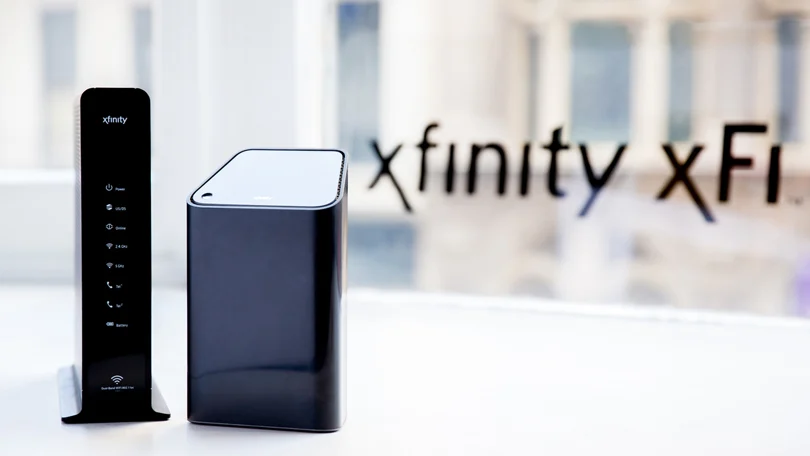
To really answer what is xFi Complete, we have to look at the hardware first. When you sign up, you get the Xfinity Gateway, which is a fancy word for a modem and router combo. This device is the brain of your home network. Unlike a basic router, this one is designed to handle more traffic. It uses smart technology to send the signal exactly where it needs to go. I noticed that many people try to save money by buying their own gear. While that can work, you often miss out on the specific software updates that Xfinity provides to keep things running smoothly.
The service works by constantly checking your connection. It isn’t just a “set it and forget it” box. It actually monitors how much data you use and where your signal might be weak. If the system sees that your upstairs office isn’t getting enough signal, it lets you know. This proactive approach is what makes it “complete” rather than just a standard plan. It takes the guesswork out of fixing your WiFi. You won’t have to spend your Saturday morning unplugging wires and hitting reset buttons anymore because the system manages itself behind the scenes.
Unlimited Data for Your Streaming Needs
One of the biggest reasons people ask what is xFi Complete is because they are tired of data caps. Most internet plans have a limit on how much you can download. If you watch a lot of 4K movies or play big video games, you can hit that limit fast. When you go over, the extra fees can be very expensive. This service includes unlimited data, so you never have to check a meter again. It gives you a sense of freedom. You can leave the TV streaming for the dog or download huge updates without a single worry about your bill next month.
I often tell families with kids that unlimited data is a life-saver. Kids today are always on YouTube or Roblox, and those apps eat up data like snacks. Without a plan like this, your monthly budget could be ruined by a few heavy gaming weeks. By choosing this upgrade, you lock in a flat rate. It makes your monthly expenses much easier to predict. No more “surprise” charges means a much happier household. It is one of the most practical parts of the package for any modern home that lives online.
Getting a WiFi Boost with Pods
Have you ever walked into your kitchen and lost your signal? We call those “dead zones,” and they are the enemy of a happy home. Part of the answer to what is xFi Complete involves a special WiFi assessment. Xfinity will actually monitor your home’s signal for 14 days. If they find that your signal is weak in certain rooms, they might provide an xFi Pod. This is a small device that plugs into a wall outlet. It acts like a bridge, grabbing the WiFi and throwing it further into the corners of your house where the main router can’t reach.
These pods are very easy to use. You don’t need to be a computer expert to set them up. You just plug them in, and they sync with your Gateway automatically. I love this feature because every house is built differently. Some have thick brick walls or metal pipes that block signals. The assessment takes the mystery out of why your internet is slow in the basement. It is a personalized solution for your specific floor plan. Instead of buying expensive third-party extenders that might not work, you get a tool made specifically for your system.
Advanced Security to Keep You Safe
The internet can be a scary place sometimes. There are hackers and bad websites trying to steal your information every day. When people ask what is xFi Complete, I always make sure to mention the Advanced Security feature. This is like having a digital bodyguard for every device in your home. It protects your laptops, but it also protects things like smart cameras and thermostats. Those “smart” gadgets often don’t have their own antivirus software. This service blocks threats before they even reach your devices, which provides a massive layer of peace of mind for your family.
I have seen many people get their data stolen because they clicked a bad link. This security system helps prevent that by blocking known dangerous sites. It also alerts you if a device is behaving strangely. For example, if your printer starts trying to send data to a foreign country, the system will stop it. You get a notification on your phone so you can take action. In a world where we do all our banking and shopping online, this kind of protection is not just a “nice to have.” It is a vital tool for staying safe.
Easy Management with the Xfinity App
Managing a home network used to be very complicated. You had to type in long IP addresses and navigate weird menus. Now, a big part of what is xFi Complete is the user-friendly app. This app puts the power in your hands. You can see every device that is currently connected to your WiFi. If you see a device you don’t recognize, you can pause its access with one tap. It makes you the boss of your own digital kingdom. The interface is clean and simple, so even a fifth-grader could understand how to use it.
The app also helps parents set healthy boundaries. You can create profiles for your children and set “bedtime” hours for their devices. When it is time for sleep, the internet simply turns off for their tablets. This helps reduce arguments and ensures everyone gets a good night’s rest. You can even reward kids with extra “screen time” through the app. It turns the technical task of network management into a helpful parenting tool. Being able to control your home’s connectivity from your phone while sitting on the couch is incredibly convenient.
Tech Upgrades Every Few Years
Technology changes very fast. A router that was great three years ago might be slow today. When you ask what is xFi Complete, you should know it includes a “tech upgrade” benefit. If you stay with the service, Xfinity allows you to upgrade to their newest Gateway every three years. This ensures you always have the latest technology without having to go out and buy a new $300 router yourself. It’s like a phone plan that lets you get the newest model every few years to make sure you have the best features available.
This is a great deal for people who don’t want to keep track of new tech trends. You don’t have to research what “WiFi 6” or “WiFi 7” means. Xfinity does that work for you. When the new hardware comes out, you are eligible to get it. This keeps your home running at top speeds as internet technology improves. It’s a smart way to “future-proof” your home. You can rest easy knowing you won’t be stuck with an old, dusty box that can’t handle the latest high-definition video or gaming needs.
Professional Support When You Need It
Sometimes, things just go wrong. Maybe a storm knocks out the power, or a wire gets loose. Another benefit of what is xFi Complete is the level of support you receive. Because you are using their equipment and their premium service, troubleshooting is much faster. The technicians can see exactly what is happening inside your Gateway remotely. They can often fix problems without even coming to your house. If they do need to send someone, they have a better understanding of your setup before they arrive at your front door.
I always tell people that time is money. Spending three hours on the phone trying to fix a router you bought at a big-box store is exhausting. With this service, the support team has the tools to help you quickly. They can run tests on your line and your hardware instantly. This joined-up approach saves you a lot of stress. When you pay for this package, you are also paying for a smoother experience when things get tricky. It’s about having a team of experts ready to help you stay connected to the world.
Comparing Costs: Is It Worth It
Now we get to the big question: how much does it cost? Usually, adding what is xFi Complete to your plan costs about $25 per month. However, you have to look at what you are already paying. Renting a standard Gateway usually costs around $15. If you want unlimited data, that can cost $30 on its own. When you add those up, the “Complete” package is actually a better deal. It bundles the hardware, the unlimited data, and the security into one cheaper price. It is designed to be a “best value” option for heavy internet users.
| Feature | Standard Xfinity | xFi Complete |
| Data Limit | 1.2 Terabytes | Unlimited |
| Equipment | Basic Gateway | Latest Gateway |
| Security | Basic | Advanced Security |
| WiFi Boost | None | Wall-to-wall Guarantee |
| App Control | Limited | Full Access |
When you look at the table above, the value becomes clear. If you are someone who works from home or has a large family, the peace of mind is worth the extra few dollars. You stop worrying about overage fees and start enjoying your internet. For a few dollars more than a standard rental, you get a much more powerful and secure experience. It really comes down to how much you value your time and your digital safety.
How to Get Started with xFi Complete
If you have decided that this sounds right for you, getting started is very simple. You can usually add it to your plan through the Xfinity website or app. Once you sign up, they will send you the latest Gateway. You just follow the instructions in the app to activate it. It usually takes less than ten minutes to get everything running. After that, the 14-day assessment begins automatically. You don’t have to do anything special; just use your internet like you normally would while the system learns about your home.
I recommend checking your email after the first two weeks. Xfinity will send you a report on your home’s WiFi health. If they see a problem, they will tell you how to get your Pod. It’s a very proactive process. You don’t have to go hunting for help; the help comes to you. This is the part of what is xFi Complete that users seem to like the most. It feels like the company is actually looking out for your connection. Once everything is set up, you can just sit back and enjoy the fast, secure, and unlimited internet.
Final Thoughts
In the end, what is xFi Complete? It is a total solution for anyone who wants better WiFi without the hassle. It gives you the hardware you need, the unlimited data you want, and the security you deserve. We live so much of our lives online now. Our jobs, our schools, and our entertainment all happen through that little box in the living room. It makes sense to invest in making that connection as strong as possible. By removing data caps and fixing dead zones, it makes your home a much more comfortable place to be.
If you are tired of slow speeds or worrying about your bill, I highly recommend looking into this upgrade. It simplifies your life by putting everything in one package. You get the latest tech, great support, and a very safe network. It is a “people-first” service that focuses on solving real problems. Don’t let bad WiFi ruin your day anymore. Take control of your home network and enjoy the freedom that comes with a complete connection. It is a small change that can make a huge difference in your daily routine.
Frequently Asked Questions
1. Does xFi Complete replace my current router?
Yes, it comes with the Xfinity Gateway which acts as both your modem and your router. You won’t need any other main boxes to get your internet working.
2. Is the unlimited data really unlimited?
Yes, with this service, you do not have a data cap. You can stream, game, and download as much as you want without worrying about extra charges on your monthly bill.
3. Do I have to pay extra for the WiFi Pods?
If the 14-day assessment shows that your home has weak spots, Xfinity will provide a Pod at no extra cost to help fix your coverage issues.
4. Can I use xFi Complete with my own modem?
No, this specific service requires you to use the Xfinity Gateway. This is because the security and monitoring features are built directly into their specific hardware.
5. How often can I get a new Gateway?
The “tech upgrade” benefit allows you to request the newest version of their Gateway every three years, ensuring you always have the latest WiFi technology.
6. Is the Advanced Security hard to set up?
Not at all! It is built into the system. You can manage it entirely through the Xfinity app, where it will show you any threats it has blocked automatically.